 Dads Framework
Multi-API Composition & CI Gates
On this page
Dads separates which routes exist on an HTTP process from where domain code lives, then checks import boundaries and code rules mechanically in CI.
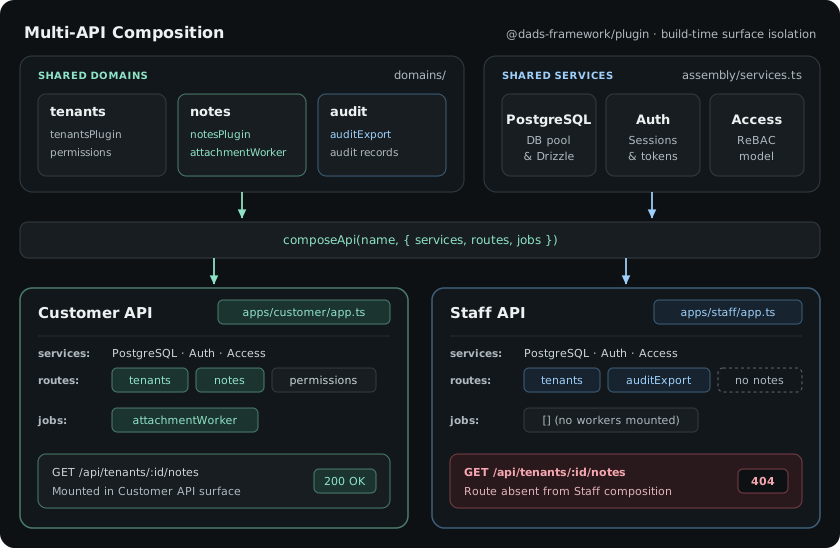
1. Compose separate API entrypoints
Each file under apps/<api>/app.ts is a short manifest calling composeApi from @dads-framework/plugin. It selects the domain plugins and background jobs that entrypoint exposes (apps/customer/app.ts):
export function customerApp(provider: ServiceProvider) {
  return composeApi("customer", {
    services: [provider, starterAccess],
    routes: [
      tenantsPlugin,
      tenantPermissionsPlugin,
      notesPlugin,
      // dad:add domains
    ],
    jobs: [notesAttachmentWorker],
  });
}
apps/staff/app.ts mounts internal routes (such as audit exports) and omits notesPlugin completely:
export function staffApp(provider: ServiceProvider) {
  return composeApi("staff", {
    services: [provider, starterAccess],
    routes: [
      tenantsPlugin,
      tenantAuditExportPlugin,
      // dad:add domains
    ],
    jobs: [],
  });
}
Customer routes are not hidden behind a feature flag on the staff server; they are never registered on that Fastify instance.
2. Enforce domain boundaries with dads.project.json
dads.project.json declares your packages and the three boundary tiers:
{
  "domainBoundaries": {
    "domains": ["src/domains/*", "domains/*"],
    "libraries": ["libraries/*"],
    "composition": ["src/composition", "apps/*", "assembly"]
  }
}
The import rules enforced by npx dad check boundaries:
domains/*can import framework packages andlibraries/*. A domain can never import another domain's tables, routes, or internals.libraries/*hold shared runtime tokens and base entity handles (such aslibraries/app-runtime/index.ts) and import framework packages only.apps/*andassembly/sit in the composition tier and wire domains together with real infrastructure (PostgreSQL, auth, mail, object storage).
When one domain needs data from another domain, define a narrow TypeScript port and wire the implementation in assembly/services.ts instead of importing across domains.
npx dad check boundaries
3. Run Doctor and changed-file verification in CI
Every starter includes npm run verify and the @dads-framework/toolbox CLI for local and CI gates:
| Command | What it checks |
|---|---|
npm run verify |
Runs boundary checks, TypeScript type-checking, web build, and tests |
npx dad check boundaries |
Fails if any file crosses a domain boundary or undeclared dependency |
npx dad doctor --gate |
Checks repo-wide rules: zero any, zero unsafe casts, routes with access, denial test coverage, and source budgets |
npx dad verify --changed --json |
Runs focused checks for files touched in the current branch |
Coding agents and CI: Because boundaries,
accessdeclarations, and denial tests are verified bydad check boundariesanddad doctor --gate, broken imports or unguarded endpoints fail before code review.
4. Deploy outside development
Every generated starter ships with a DEPLOY.md and production scripts in package.json:
- Install dependencies from the committed lockfile with
npm ciand runnpm run verify. - Set
DATABASE_URL,DADS_IDENTITY_SECRET, andDADS_BASE_URLin your runtime secret store. - Run database migrations once before booting new API instances:
npm run migrate
- Start each API process by selecting
DADS_API=customerorDADS_API=staff:
NODE_ENV=production DADS_API=customer HOST=127.0.0.1 PORT=3000 npm run start:api
- Check liveness against
/api/health:
curl -fsS http://127.0.0.1:3000/api/health
A healthy process responds with HTTP 200 and { "data": { "status": "ok" } }.
Related references
@dads-framework/toolboxfor all CLI commands and JSON output schemas@dads-framework/pluginforcomposeApi,defineService, andprovidePlugin- Architecture decisions